When Claude Code, Cursor, Copilot, or ChatGPT in your browser hangs, watson tells you who to blame: your network, your machine, or the provider. It only reads timing. It doesn't decrypt anything, and nothing leaves your laptop.
Native clients and web chatbots land in the same log, scored against the same baselines, so you can compare Claude Code with Claude in a browser tab.
Recognises each app by the process that owns the connection, and the provider by the TLS server name.
AppsRecords when each streamed chunk arrived and how big it was. Passive capture adds round-trip and retransmit evidence where it can see the connection.
Any Chromium browserBrowser caveat: over HTTP/3 (QUIC), or on a connection opened before watch started, the network is hidden. You still get the exact first byte, duration and pauses, but the score falls back to time-to-first-byte only and is marked ~. For full network evidence, start watch first, then relaunch the browser. More on browsers and QUIC.
Ask them in this order. Most "slow AI" complaints are settled by question two.
Check round-trip time and retransmits against your normal. On a Mac, watson also tells you which side of your router a stall was on. Only touch Wi-Fi, VPN or ISP if they're off.
Long time-to-first-byte or provider wait on a healthy path means the provider is the bottleneck, and nothing you change locally will help.
Network fine, service fine, still slow? The time is going somewhere off the wire: your machine (pauses marked A, H or C), local tools, model thinking, or giant context.
On an encrypted stream, a thinking model and a stalled network look identical. watson checks what else was happening during every pause over 1 second, in this order:
A network stall where your first hop was the problem: a spike or lost ping from your router, or weak Wi-Fi.
A network stall while your router answered normally, so the problem is past your local network.
A retransmit or an RTT spike big enough to explain the pause, with no Wi-Fi or router samples to say which side it was on.
The same app was talking to non-AI hosts. A heuristic, labelled as one.
The Mac was hot or in Low Power Mode while it was also busy.
The AI app itself was short of resources: its own CPU was high, memory pressure was up, or the Mac was swapping.
System CPU above 90% during the pause.
Nothing else explains it: the path was healthy and the machine idle, so the service was busy.
Each response also gets a 0–100 Transport Score against your own rolling baseline per provider and app: connection health 35%, TTFB 30%, network stalls 25%, setup 10%. L, U and N all count as network stalls, and H counts against the score too. Provider wait never does.
If your own CPU was maxed out, watson ignores router spikes, because a busy machine is slow to answer its own pings. Each pause is also marked several apps, same provider or this app only, depending on whether other apps had trouble at the same moment.
Roughly 960 interactions across Claude Code, Claude Desktop, ChatGPT, Codex and VS Code, before browser support landed.
For 7.6 seconds nothing crossed the network. That could be a tool running, the model thinking, or you, and from the wire watson can't tell which. A network fix won't shorten it.
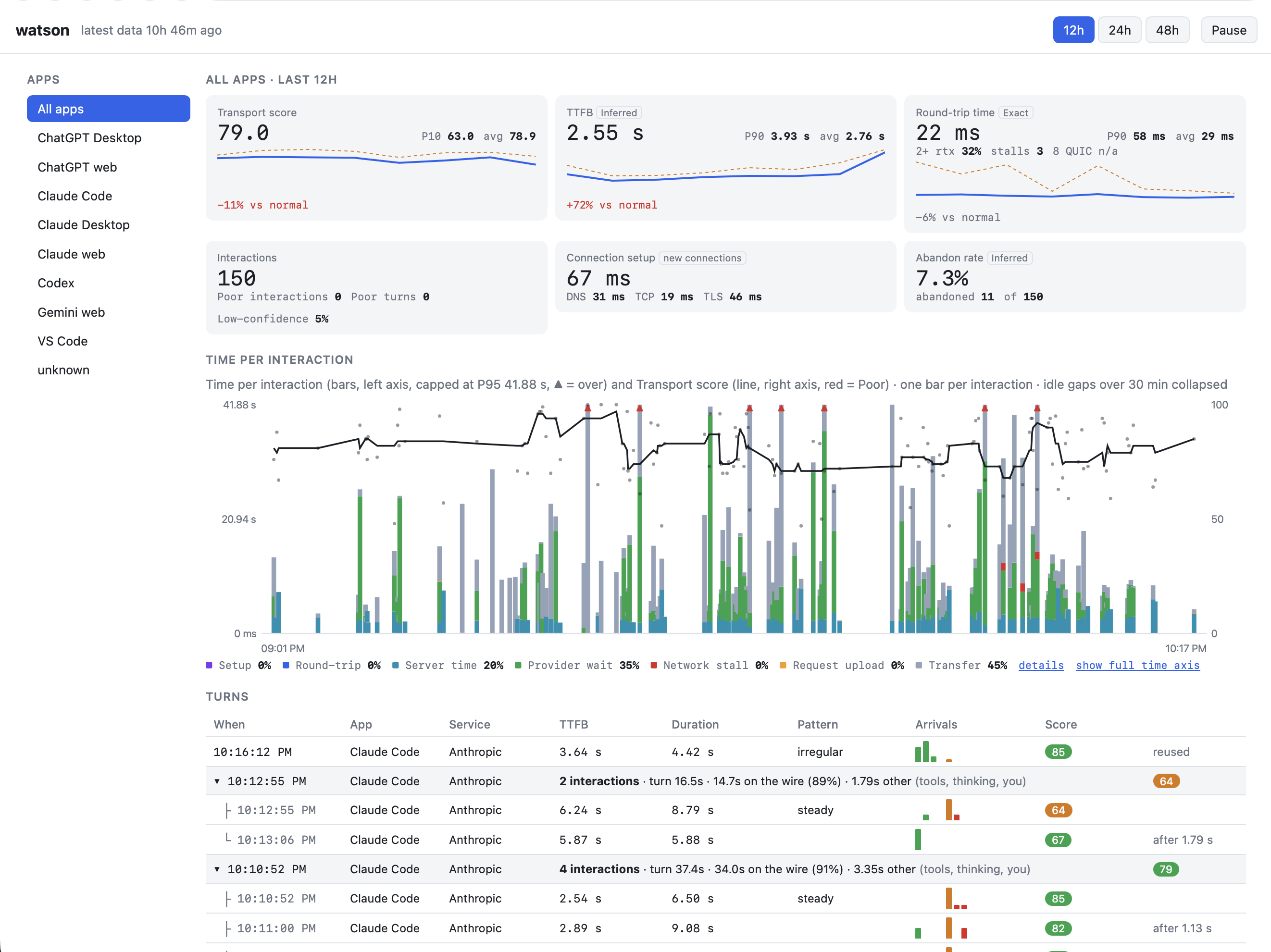
watson serve: tiles vs your normal, every interaction split into setup, round-trip, server time, provider wait, stall and transfer, plus the worst offenders.The live page also has a Report tab that counts delivery patterns and device conditions and lists recent interactions the provider didn't slow down, and a Device tab that ranks apps by CPU during spikes, with a CPU-by-app chart for each one. A per-minute strip of Wi-Fi, router ping and CPU is shaded wherever memory was tight, the machine was swapping or the Mac was throttled. The turns table has a Cause column, and opening a turn shows how much of it was on the wire, with one lane per interaction labelled with its duration.
One Go binary plus an optional browser extension. macOS and Linux. Capture needs root; the live page doesn't.
# build $ go build -o watson ./cmd/watson # terminal 1: watch every AI response on this machine $ sudo ./watson watch --min-duration 1 # terminal 2: open the live page it prints $ ./watson serve # optional, for web chatbots: in any Chromium browser # chrome://extensions → Developer mode → Load unpacked → extension/
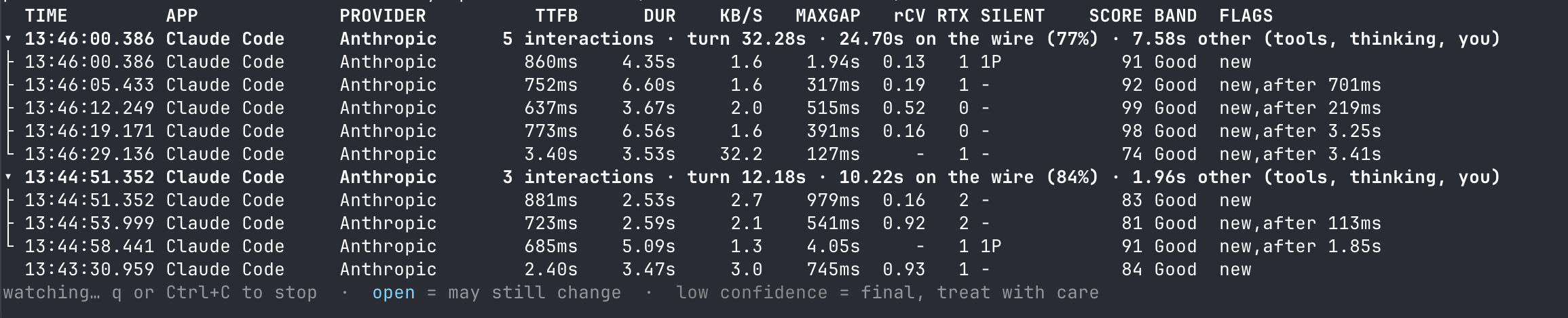
watson watch: one row per response. SILENT 1N 2P = one network stall, two provider waits.A turn that's still running counts up live and is marked "so far". If CPU hit 70% while nothing was on the wire, the turn's header says "machine busy". watson only ever says yes to that; it never claims the machine was idle.
--no-process-names turns that off.Known blind spots: no tokens or model names; QUIC/HTTP3 hides retransmits and RTT, though a router spike can still mark a pause as a local-link stall; corporate VPNs and Zscaler tunnels hide destinations (watson detects this and tells you which interface to capture on instead).
Profiles for bulk transfer, real-time media, remote sessions and push are coming, so the same question works for any desktop or web app.